Questions, answered
What Kuickr is, how to connect Claude or Codex in under a minute, and how the CLI and sharing work.
Start here
What is Kuickr?
Kuickr hosts a folder of your docs at clean URLs. Point it at a docs folder — from your repo, the CLI, or an AI chat — and every file gets a permanent address like
kuickr.co/you/handbook/intro.md. Markdown renders to clean pages; HTML, PDFs and images are served as-is.How is Kuickr different from a paste-and-link host?
Most "host this" tools give you a link — a random URL to one throwaway page. Kuickr gives you a place. Pages live in folders that own a readable path (
kuickr.co/you/handbook/intro.md), so you find them by where they live, not by remembering a slug. The same agent — or you, three weeks later — can read, edit, restyle, search, and see the full revision history. You publish and keep, instead of publish and forget.Connect Codex, ChatGPT, or Claude
No token, no client ID, no secret. Add
https://kuickr.co/mcp, then approve the Kuickr sign-in in the browser.Claude no terminal
Settings → Connectors → Add custom connector. Name it kuickr, URL https://kuickr.co/mcp, leave the OAuth fields blank → Add → approve the sign-in.
ChatGPT no terminal
Use a ChatGPT Business, Enterprise, or Edu workspace with custom MCP apps enabled. In ChatGPT web, open Settings → Apps, create/add a custom app or custom MCP server, paste https://kuickr.co/mcp, then approve the OAuth sign-in. The exact label can vary by rollout.
Claude Code one line
claude mcp add --transport http \
  kuickr https://kuickr.co/mcp
Then run /mcp → Authenticate → approve in the browser.
Codex CLI one line
codex mcp add --url https://kuickr.co/mcp kuickr
codex mcp login kuickr
Add the server, then approve the OAuth sign-in in the browser.
Show me the full Claude walkthrough (with screenshots)
- Open Settings → Connectors → Add custom connector.
- Name it
kuickrand set the URL tohttps://kuickr.co/mcp. Leave OAuth Client ID and Secret blank — Kuickr registers the client automatically (Dynamic Client Registration), so you don't need them.
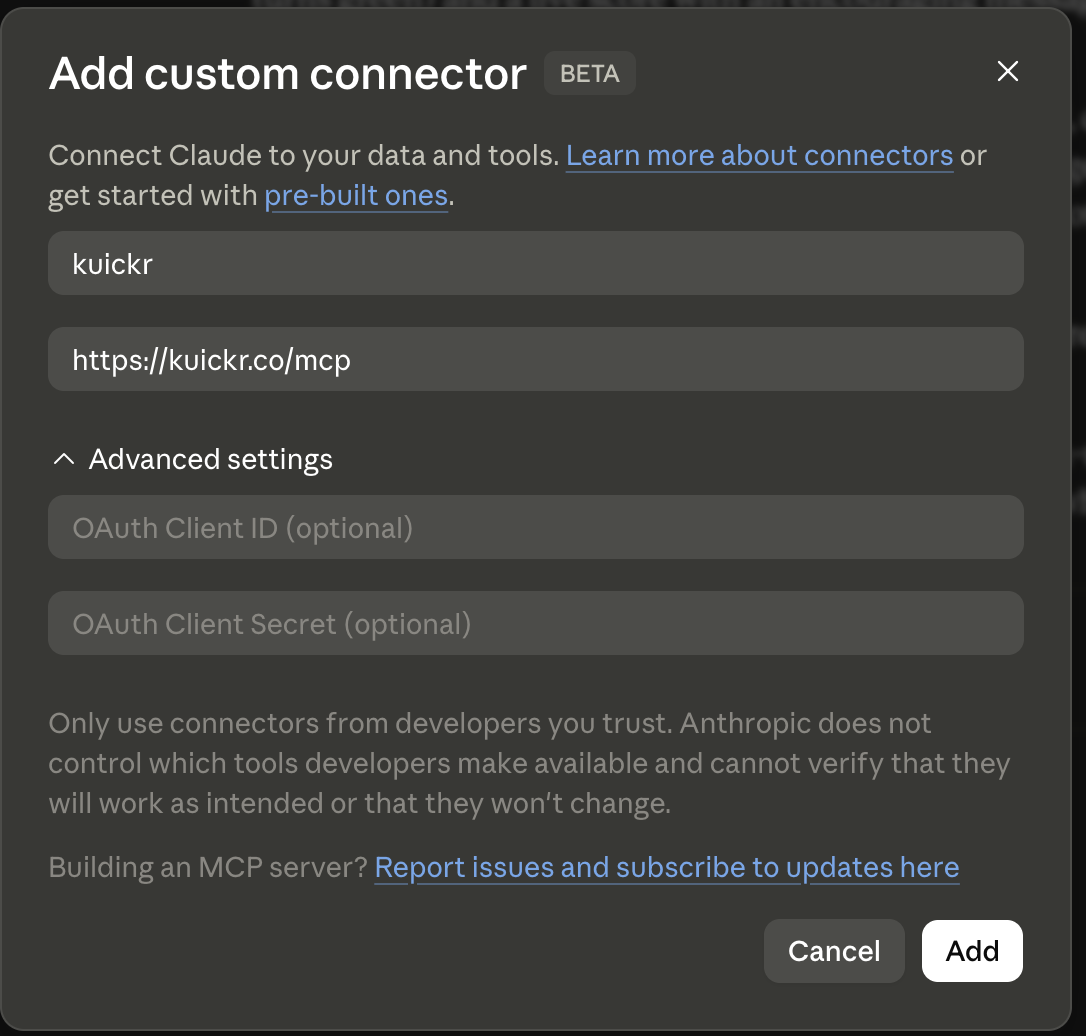
- Click Add. Claude opens a browser to sign in to Kuickr — approve the connection (no token to paste).
- The connector shows as connected with its 13 tools. Set each tool to allow or ask — e.g. keep
kuickr_space/kuickr_folderon "ask," the rest on "allow."
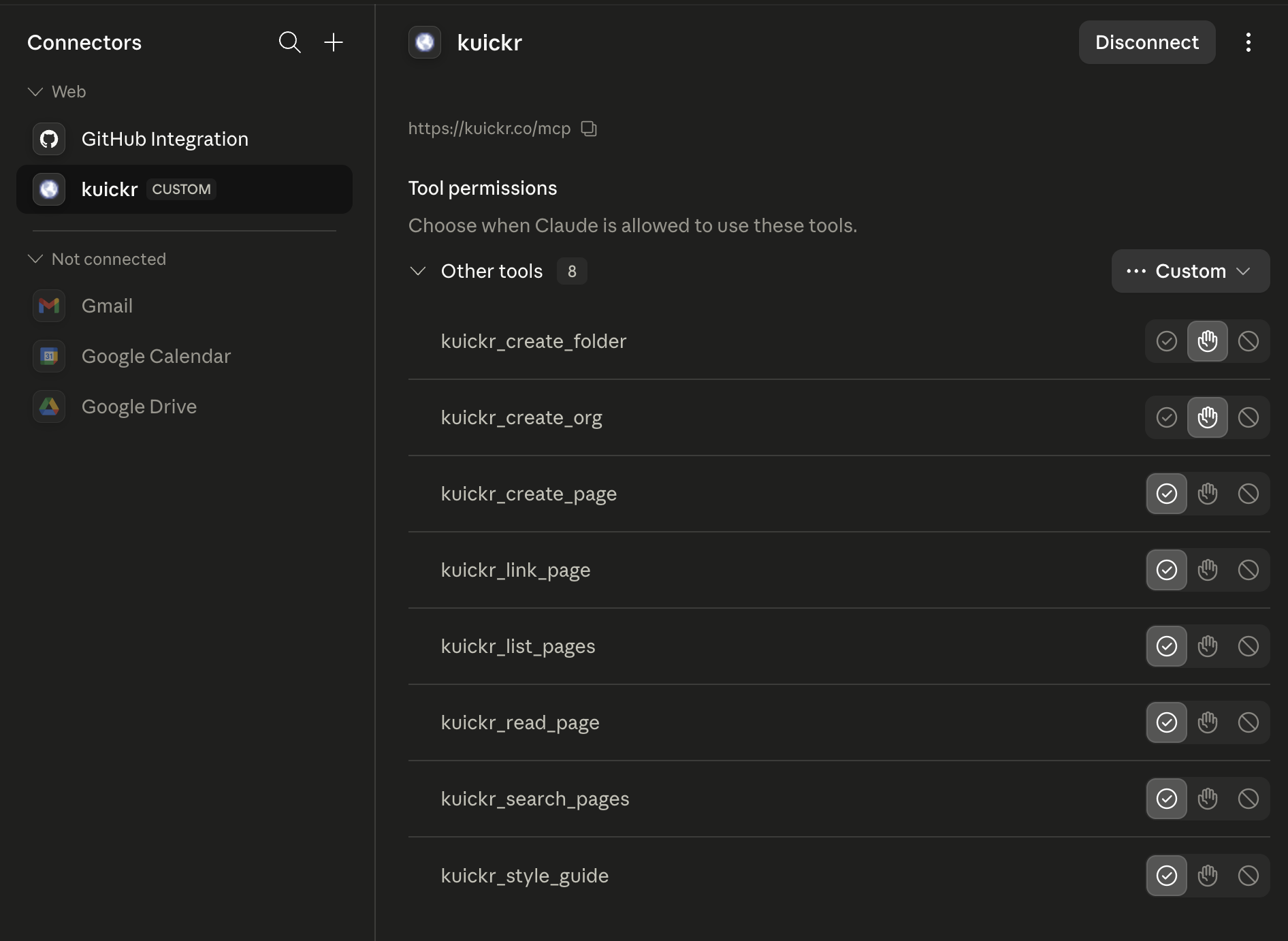
Now in any chat: "Use kuickr to list my pages" or "Read my-org/handbook/intro.md and fix the typo in the first heading."
Codex says OAuth login requires RMCP?
Some older Codex CLI builds require the remote MCP OAuth client to be enabled before
codex mcp login kuickr works. Add experimental_use_rmcp_client = true to ~/.codex/config.toml, or run the login once with codex -c experimental_use_rmcp_client=true mcp login kuickr. Then open a new Codex chat and run /mcp to confirm Kuickr is connected.Using it
What can an agent actually do?
Kuickr exposes an MCP server at
https://kuickr.co/mcp with 13 tools to list, read, search, choose design tokens, create, edit, move, and share pages and folders. Creating a page at an existing path edits it — including HTML pages, hosted as-is. Every tool is permissioned, and you approve them per-tool the first time you connect.What are good first prompts?
Once connected, just talk to it: "Use kuickr to list my pages." · "Publish these notes to kuickr and give me the link." · "Read you/handbook/intro.md and fix the typo in the first heading." · "Search my kuickr pages for the deploy runbook."
Can I limit what my agents touch?
Yes — per folder. In a folder's settings there are two toggles: AI can read and AI can update. Turn off "read" to keep a folder out of agent reach entirely; turn off "update" to make it read-only to agents (they can list and read it, but create/edit/share is blocked). Both default on, so nothing changes until you flip them.
If a chat edits a page, does it sync back to my git repo?
No — and this matters. CLI
push writes from your files; chat/agent edits write to Kuickr directly. They don't flow back to your repo, and the next push from your repo would overwrite them. Pick one source of truth per folder: repo-driven (push only) or Kuickr-driven (edit in place via chats).CLI & repos
How do I install the CLI?
curl -sSL https://kuickr.co/install.sh | shmacOS & Linux. Or
brew install nauman/tap/kuickr. Then run kuickr login --browser and approve the browser prompt. See the full CLI page.Why does the CLI open an “Authorize the Kuickr CLI” page?
That page is the browser-login approval step. When you run
kuickr login --browser, the CLI starts a temporary callback on your own computer, usually something like http://127.0.0.1:59429/callback. Approving sends an API token back to that local callback so the CLI can save it. Only approve if you just ran the command yourself. Kuickr rejects non-loopback callback hosts, so the token cannot be redirected to a remote website. The step-by-step version is on the CLI login guide.How do I publish my first docs?
kuickr docs create handbook      # scaffold a starter folder
kuickr attach handbook --space you --dir handbook
kuickr open you/handbook
The folder structure becomes your URL structure — numbered files order the sidebar, and
##/### headings build the on-page table of contents automatically.Does the CLI use git to track changes?
No.
kuickr push is a content sync, not a git operation. It walks your --dir folder, hashes every file, and uploads. The server keeps what changed and skips what didn't — there's no git history involved. The --repo/--branch flags on attach only record where the docs came from as a label; they don't pull from git.What happens when I run push?
Every matching file (
.md, .html, .pdf, images) is uploaded with a content hash. The server upserts changed files, skips unchanged ones, and prunes files you've deleted locally — so the hosted folder mirrors your directory. Pass --keep to skip pruning.How do I update a page?
Edit the file and re-run
kuickr push. To automate it, wire kuickr push into a git hook or CI step (e.g. a GitHub Action on merge) so every commit re-syncs.Sharing & visibility
Can I use tracked links for campaigns or affiliate destinations?
Tracked links support direct redirects and message pages. A message page names the visible destination host before a visitor continues. Kuickr does not certify that a redirect is accepted by an ad network or affiliate program: you are responsible for the destination, disclosures, and campaign setup. Check the current Google Ads destination requirements and, when relevant, the Amazon Associates operating agreement or your provider’s current terms.
Are my pages public or private?
Private by default. A page is only reachable anonymously once you share it. Pages an agent drops in your
inbox are private until you share them.How do I share a page or folder?
From your dashboard, use Share on a folder — or have an agent call the share tool — to mint a public link, optionally password-gated. Share a folder once and every page under it is reachable; no re-sharing per page.
Accounts & tokens
Where's my API token, and can I use env vars?
The easiest path is
kuickr login --browser. If you need manual or scripted auth, copy a token from settings and run kuickr login --token <TOKEN>. The CLI stores it in ~/.kuickr/config.toml. For agent sessions, export KUICKR_TOKEN (and KUICKR_HOST) to override the file — handy with a secret manager. Codex users can point bearer_token_env_var = "KUICKR_TOKEN" at it in ~/.codex/config.toml.